
Starter
One person prospecting
Offer · First 50 customers
€49
Antes €99 /month · your first 6 months
Then €99/month
- 1,500 leads analyzed/month
- 1,000 personalized emails/month
- Up to 100,000 organizations
- 1 inbox · 1 user
- Unlimited campaigns
AI-powered B2B prospecting
Personalized prospecting, at scale.
Dressmail finds companies, reads their websites, verifies their email addresses and writes each one a different message that proves you did your homework. It sends from your own inbox, at a human pace, and drafts your reply when they write back.
From antes €99 €49/month for the first 50 customers · 7-day free trial, no card needed
Quality check passed
No made-up facts · language EN · CTA
To Sarah Mitchell · Mitchell Dental
Subject Your new practice in Richmond
Hi Sarah, I saw you’ve just opened your second practice in Richmond and now offer clear aligners.
From their websiteWe help practices like yours fill the diary with new patients without relying on discounts.
From your knowledgeWould 15 minutes on Thursday work for a quick chat?
Your styleSent · 09:14 · from marc@youragency.com
Grade A · 86
Sarah · Mitchell Dental Interested
Yes, we’re interested. Could we talk Thursday afternoon?
You · Dressmail draft Sent ✓
Perfect, Sarah! I’ll send you an invite for Thursday at 4pm.
Sarah · Mitchell Dental
Got it. See you Thursday!
Lead closed · Meeting booked
What Dressmail is
Unlike tools that rely on merge tags like {{first_name}} and {{company}}, Dressmail understands each prospect’s business before it writes a single word. It visits their website and works out what they offer, who they sell to and what makes them different. Combine that with what it knows about your business, and you get an email that reads as if it were researched and written by hand, even when you’re reaching out to hundreds of companies.
Every email mentions specific details about the recipient’s business, taken straight from their website.
The 30 minutes of research per prospect happen on their own while you get on with something else.
Show it how you write (samples, tone, the words you use and avoid) and every email will sound like you.
The problem with cold email
Almost every tool promises personalization and delivers the same template with a different name on it. Recipients can tell within two lines.
“Hi {{first_name}}, I noticed you work at {{company}}…”
“I saw you’re expanding your SAP integration services for industrial SMBs. Many companies in your space…”
It’s not about sending more. It’s about sending better.
Getting started
Everything you share in the welcome wizard (eight steps you can pause and come back to) is what it draws on to write every single email.
From list to meeting
Find
Search for businesses on the map by category and city, import a CSV or Excel file, or paste in a handful of websites. Duplicates disappear on their own.
See how company discovery works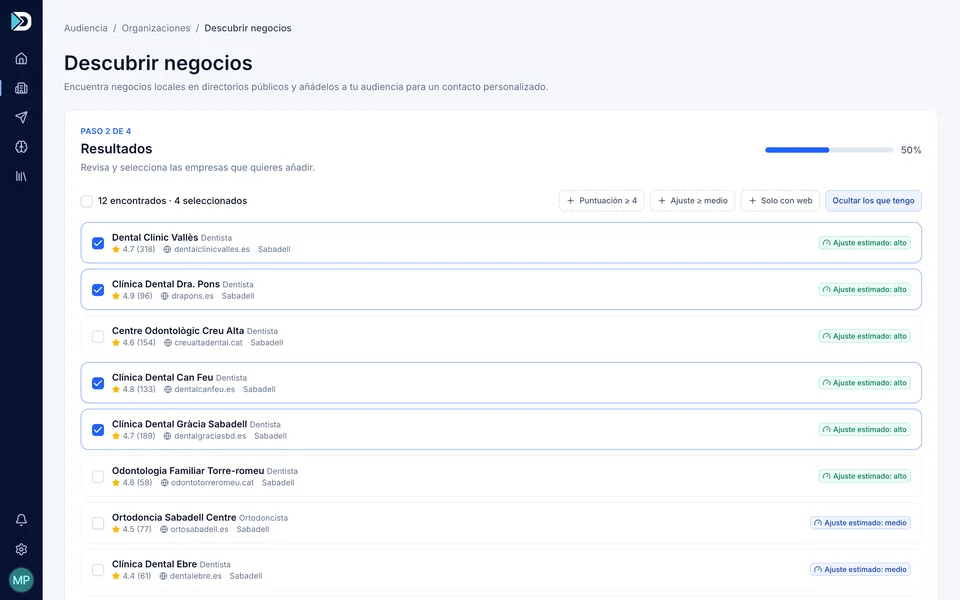
Enrich
Dressmail reads each company’s website, sums it up, finds their email addresses and verifies them. Then it scores their fit with your ICP (ideal customer profile), grades them from A to D and tells you why.
See website reading and scoring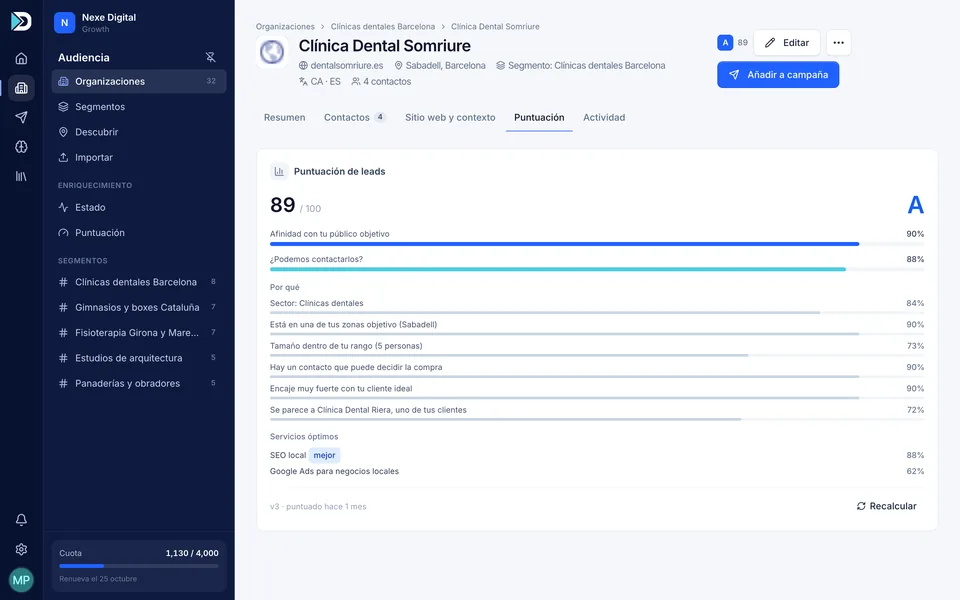
Write
Every email combines three things: what the prospect’s website says, what Dressmail knows about your business and how you write. Pick the framework (AIDA, PAS, BAB, PPP, QVC) or let Dressmail choose the best one for each lead.
See templates and frameworks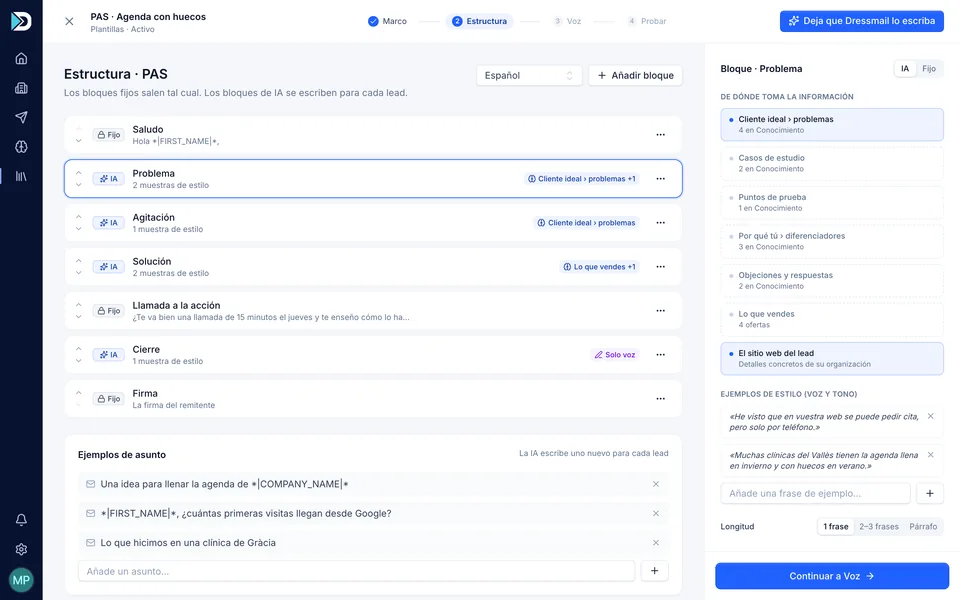
Send & convert
Sequences with follow-ups in the same thread, A/B tests, schedules that respect public holidays, and replies sorted into eleven intents, each with a draft ready to go.
See campaigns and sequences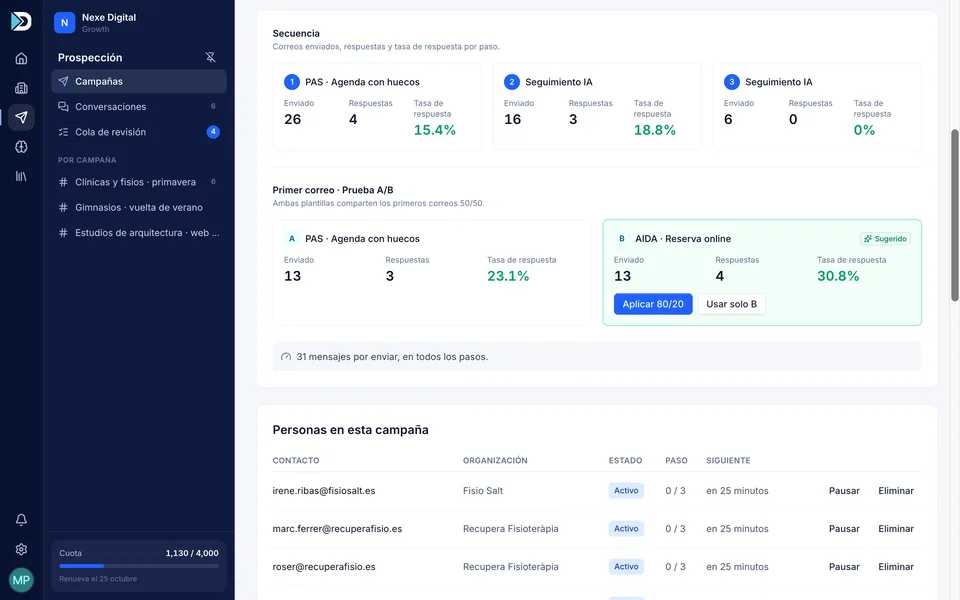
No black boxes
The AI writes. You decide. Every email can be explained, reviewed and, if need be, stopped.
Every paragraph shows its source: the lead’s website, your knowledge base or your writing style. You also see the framework, the offer and the grade that were used.
If an email cites a fact that isn’t on the lead’s website or in your knowledge base, it doesn’t go out. It gets rewritten once; if it fails again, it’s skipped and doesn’t use up your quota.
The first emails of every campaign are held back so you can approve, edit or regenerate them. With a review queue for the whole team.
60% fit with your ICP (ideal customer profile) + 40% reachability, with the reasons written out. If it isn’t sure, it says so.
Your inbox stays yours
Conversations
Dressmail reads the replies in your inbox and sorts them into eleven intents. For each one it follows the strategy you’ve chosen and drafts your answer: send it in one click, ask for another version, or make it shorter, more formal or friendlier.
Sarah Mitchell · Mitchell Dental
InterestedYes, we’re interested. Could we talk Thursday afternoon?
Suggested draft · Move toward the goal: meeting
Perfect, Sarah! I’ll send you an invite for Thursday at 4pm.
Sent in the same thread
Sarah Mitchell · Mitchell Dental
Got it. See you Thursday!
Privacy
Connect
And for everything else, a REST API and signed webhooks (Growth plan).
Early access
We’ve just opened the doors to Dressmail. We can’t show you customer logos yet. What we can offer our first 50 paying customers is 50% off their first six months and a direct line to the people building it. In return, they tell us what works and what doesn’t.
Offer limited to the first 50 paying customers. The discount applies to your first 6 months and carries over if you switch plans. VAT not included.
One person prospecting
Offer · First 50 customers
€49
Antes €99 /month · your first 6 months
Then €99/month
A small team
Offer · First 50 customers
€99
Antes €199 /month · your first 6 months
Then €199/month
Dressmail visits their website, reads their pages to understand what they do, who they serve and how they position themselves, and finds and verifies their email addresses. Then it scores their fit with your ICP and grades them from A to D. Everything is saved to their profile and used to write to them.
Mailchimp sends the same newsletter to a list of people who gave you permission. Dressmail writes a different email for every company and sends them one at a time from your inbox, just as you would.
Yes. You connect your inbox (Google Workspace, Microsoft 365 or another provider) over SMTP and IMAP. Recipients see your real address and replies come straight to you.
Because writing well takes more than copying a template. Every email means reading a website and writing a different message, and sending at a human pace protects your domain. Fewer emails, better written.
Every email goes through a check before it leaves. If it cites a fact that doesn’t exist, it gets rewritten or it isn’t sent. On top of that, you review the first ones in every campaign.
Thirteen: Spanish, Catalan, Basque, Galician, English, French, German, Italian, Dutch, Polish, Russian, Turkish and Ukrainian. It can write to each lead in their own language.
Yes. When you create your account you get a 7-day free trial, no card needed, with 50 leads analyzed and 50 emails so you can judge the quality on your own leads.
From the blog

Deliverability · 7 min
The three DNS records that decide whether your email lands in the inbox or in spam. What each one does, how to set them up in Google Workspace and Microsoft 365 and how to check they’re working.

Writing · 6 min
The difference between putting someone’s name in an email and proving you’ve read their website. What real personalization is, how to spot the fake kind and how to write an opening paragraph that earns the second one.

Writing · 7 min
A framework isn’t a template: it’s the order in which you tell the story. Five structures for writing cold emails, when each one works and a real example of each.
Early access
Create your account and get started today. The first 50 customers pay half, with a 7-day free trial, no card and no lock-in.
Not convinced? Take your data with you.